FREE 1 to 3-Day Delivery on Orders $149+ Details
MSD Programmable Digital Shift Light - Installation Instructions

Shop Parts in this Guide
Installation
Programming:
By pressing the two buttons simultaneously, you get the Shift Light into the different programming modes.
RPM Points:To adjust rpm points, press the two buttons until the rpm shows. Notice that all but one of the numbers flash. The position of the steady digit matches the gear change (the first, second, third or fourth digit equals each gear). Adjust the rpm then push the two buttons again to move to the next gear.
Cylinder Count:The display will read CY and allow you to select between one to 12-cylinder engines using the Up/Down buttons.
Intensity:Control the intensity of the LED and read out. Hold the buttons until LuL displays. Use the buttons to select from 9 (brightest) to 0 to turn off the shift light.
Self:Self mode will walk through all of the settings programmed into the light. It will first show the rpm shift points for the four shifts, the cylinder count and light intensity. Start the test mode by pushing either button once Self is displayed. To reset the Self mode, push either button when SELF is displayed, or turn the power Off.
Each time the DSL is powered on, the LED will display the program values that are set.
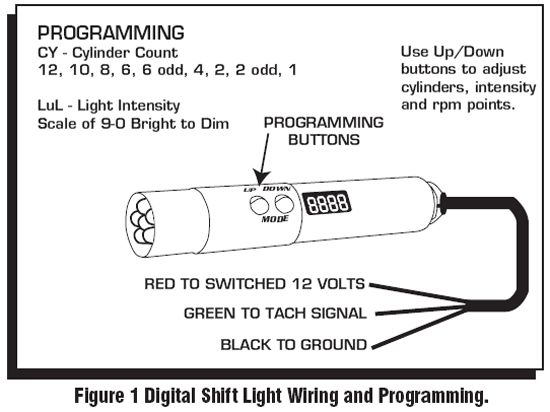
Installation:
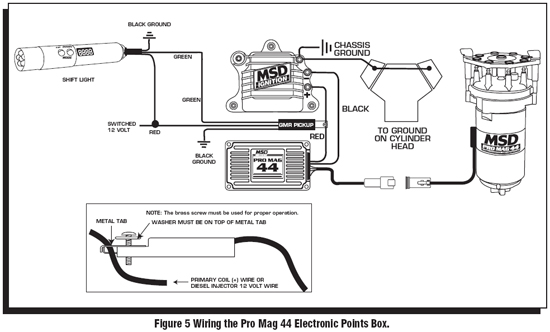
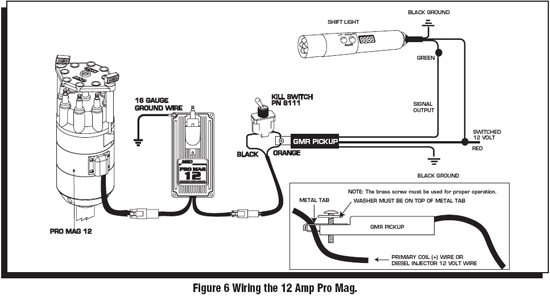
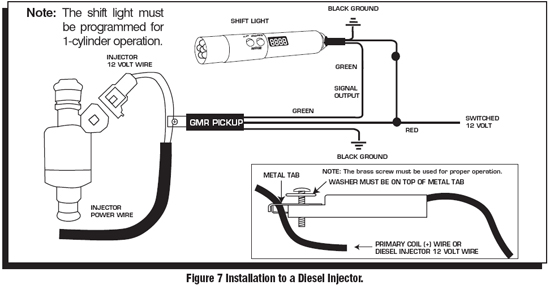
1. The Shift Light installs easily with the GMR Pickup or through the tach output terminal of an MSD Ignition Control or aftermarket ECU. It will accept a trigger signal rated from 0-24 volt amplitude.Never connect the Green Wire directly tithe coil negative terminal.If an ignition control or aftermarket ECU are not being used, the GMR pickup must be connected.
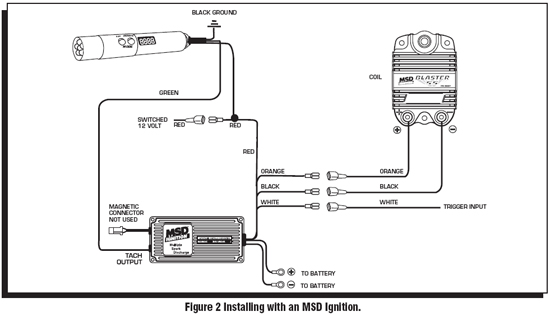
GMR Pickup Installation
1. The MSD GMR pickup can be used with inductive or capacitive ignition types to provide an RPM signal of 30% duration when the ignition coil fires. Two washers are provided with the pickup and must be installed in one of two positions depending on the type of ignition driving the coil.
Note:For late model applications, it is recommended to have a wiring schematic of the vehicle’s ignition system.
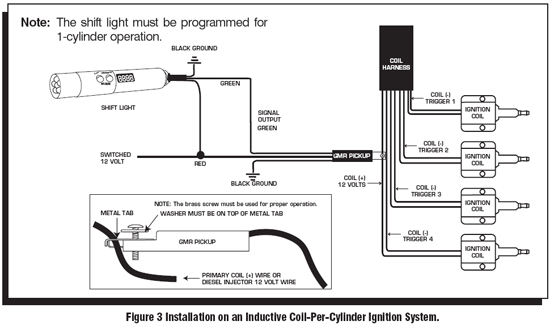
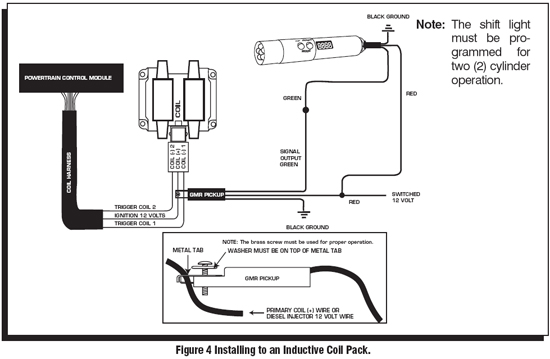
2. A momentary push button switch can be connected with tach input green wire to ground to reset the PN 8963 to the first gear value at any time - normally the RPM must drop to under 1700 rpm for the PN 8963 to reset to the first gear value.
Installation instructions provided by MSD